

Two years ago, I sat in a conference room with a dead laptop battery and a printed spreadsheet full of regional sales numbers. Each region had different revenue weight. I grabbed a pen, drew a quick table, and worked through the formula by hand. The answer was 78.4, verified perfectly on my laptop later. That five-minute manual calculation saved the meeting.
Knowing how to calculate a weighted average without technology is a practical skill that pays off in classrooms, boardrooms, and everyday decisions. This guide walks you through every step with real examples. By the end, you will handle manual weighted average calculations with confidence, or verify results from our weighted average calculator.
When Should You Calculate a Weighted Average Manually?
Manual calculation makes sense whenever you want full control over the math, need to verify a tool's output, or lack access to digital resources.
Situations Where Manual Calculation Is Helpful
Students doing statistics homework benefit from hand calculations. It cements the relationship between values, weights, and results. Financial analysts sometimes recalculate key metrics manually to confirm spreadsheet accuracy before presentations.
When a Calculator Isn't Available
Exam rooms, field work, power outages, and offline environments remove access to digital tools. A notebook and pen become your instruments.
Checking Calculator Results by Hand
Blind trust in software is risky. Mistyped values or wrong formula references can produce subtle errors. Spot-checking by hand catches mistakes before they reach your final report. Our guide on how calculators work internally explains why verification matters.
What Do You Need Before You Start?
Before you touch a single number, gather two things: a complete list of values and the weight for each one.
List of Values
Values are the raw numbers to average: test scores, product ratings, stock returns, or any measurable quantity. Write them in a single column.
Corresponding Weights
Each value needs a weight reflecting its importance. In classrooms, credit hours serve as weights. In portfolios, the dollar amount is the weight. In reviews, the number of reviewers at each star level becomes the weight.
Calculator or Pen and Paper
For truly manual work, all you need is something to write on. A basic four-function calculator helps with large numbers.
Organizing Data into a Table
A three-column table keeps everything clean: value, weight, and product. This format prevents the most common errors.
Matching Every Value with the Correct Weight
Misalignment is the most damaging manual calculation mistake. Number your rows and verify alignment before multiplying.
Data Organization Template
TemplateUnderstanding the Weighted Average Formula
The weighted average formula is straightforward once you see its four building blocks: values, weights, sum of products, and total weight.
Formula Overview
Weighted Average = (x1*w1 + x2*w2 + ... + xn*wn) / (w1 + w2 + ... + wn). Every manual calculation follows this structure, no matter the context.
What Each Symbol Means
Values (x)
Each individual measurement or score in your data set: exam grades, return percentages, or satisfaction ratings.
Weights (w)
The importance assigned to each value. A larger weight pulls the average closer to its paired value. The weighted percentage calculator handles percentage-based weights, but the math is identical by hand.
Sum of Products
After multiplying every value by its weight, sum all products. This becomes the numerator of the formula.
Total Weight
Adding all weights gives you the denominator, normalizing the result within the range of your original values.
Weighted Average Formula Breakdown
Diagram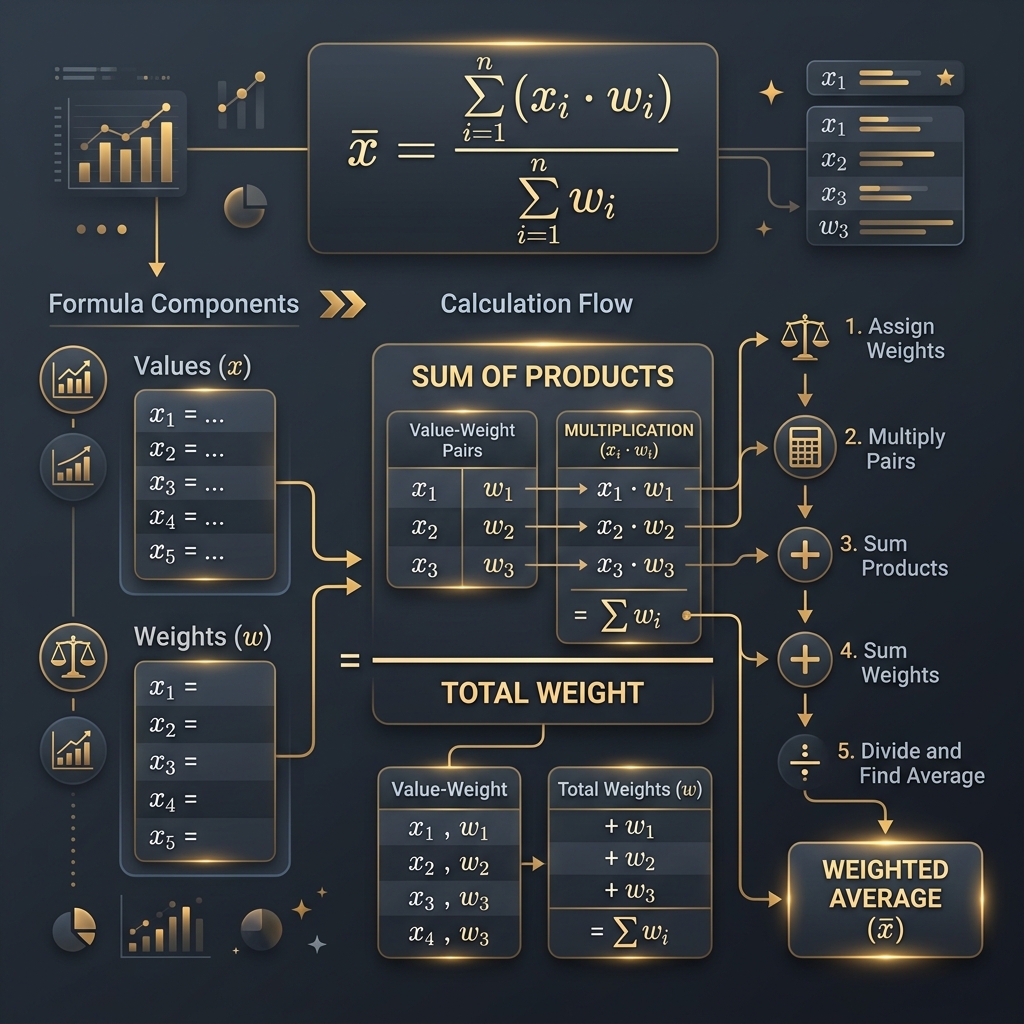
Each component of the formula connects logically: values pair with weights, products sum upward, and division produces the final answer
Step-by-Step Guide to Calculating a Weighted Average Manually
Follow these six steps in order for the correct weighted average every time.
Step 1: Write Down All Values
List every value in a column. For a student grade example: 92, 85, 78, 90.
Step 2: Assign the Correct Weight to Each Value
Next to each value, write its weight. For grades with credit hours: 4, 3, 3, 2. The weighted grade calculator automates this, but manual work teaches you to catch alignment errors.
Step 3: Multiply Every Value by Its Weight
Create a product column: 92 x 4 = 368, 85 x 3 = 255, 78 x 3 = 234, 90 x 2 = 180.
Step 4: Add All Weighted Products
Sum the products: 368 + 255 + 234 + 180 = 1037. This is the numerator.
Step 5: Add All Weights
Sum the weights: 4 + 3 + 3 + 2 = 12. This is the denominator.
Step 6: Divide the Sum of Products by the Sum of Weights
Final division: 1037 / 12 = 86.42. The student's weighted average is 86.42 out of 100.
Manual Calculation Checklist
Live Manual Calculation Walkthrough
Try ItManual Weighted Average Calculation Examples
Multiple examples in different contexts build confidence for any weighted average problem.
Example 1: Student Grades
A student earned 88 in Biology (4 credits), 95 in English (3 credits), and 72 in Art (1 credit). Products: 88x4=352, 95x3=285, 72x1=72. Sum: 709. Total credits: 8. Weighted average: 709/8 = 88.63. Biology's weight pulls the average toward 88 rather than the simple average of 85.
Example 2: Product Ratings
A product received 200 five-star, 50 four-star, and 10 one-star reviews. Products: 5x200=1000, 4x50=200, 1x10=10. Sum: 1210. Total: 260. Weighted average: 4.65 stars, far more accurate than a simple average of 3.33.
Example 3: Investment Allocation
Stock A: 12% return on $30,000. Stock B: 5% on $50,000. Bond C: 3% on $20,000. Products: 360000+250000+60000=670000. Total: 100000. Weighted return: 6.70%. The weighted investment calculator handles this instantly for larger portfolios.
Verifying the Final Answer
Every weighted average must fall between the smallest and largest values. If the student example produced below 72 or above 95, something went wrong.
Example Results Comparison
VisualHow to Calculate Weighted Average Using Percentages
Percentage weights work identically to regular weights. The only difference is conceptual, not computational.
Converting Percentages into Weights
When a syllabus says the final is worth 40%, that 40 becomes the weight. Homework 25%, midterm 20%, participation 15% give weights of 40, 25, 20, and 15. Use these directly.
Working with Percentage Weighting
Scores: final 88, homework 92, midterm 75, participation 95. Products: 88x40=3520, 92x25=2300, 75x20=1500, 95x15=1425. Sum: 8745. Total: 100. Weighted average: 87.45.
Percentage Calculation Example
When weights sum to 100, dividing by 100 is the same as moving the decimal two places left. The sum 8745 divided by 100 gives 87.45 almost instantly.
What If the Percentages Don't Equal 100%?
The formula still works. If weights total 90, divide by 90. The concern is whether you accidentally omitted a category.
How to Calculate Weighted Average with Decimal Weights
Decimal weights offer precision common in statistical analysis, research, and portfolio allocation.
Decimal Weight Example
Three survey groups scored 8.2, 7.5, and 9.1 with normalized weights 0.5, 0.3, and 0.2. Products: 4.10+2.25+1.82=8.17. Total weight: 1.0. Weighted average: 8.17. When weights sum to 1.0, the sum of products is your answer directly.
Fractional Weight Example
Weights of 1/4, 1/2, and 1/4 convert to 0.25, 0.50, 0.25. Values 100, 80, 60. Products: 25+40+15=80. Total: 1.0. Weighted average: 80.
Mixed Weight Formats
Avoid mixing formats. If one weight is 0.30 and another 40, the scales are mismatched. Convert everything to the same format. The weighted average calculator for statistics normalizes automatically, but manual work requires your discipline.
Manual Weighted Average vs Simple Average
The difference comes down to one question: does every value matter equally?
Calculation Process
A simple average sums values and divides by count. A weighted average multiplies each value by its weight, sums products, and divides by total weight. One extra step changes the denominator from count to total weight.
Accuracy Differences
When data points have different importance, simple averages mislead. A 4-credit A and a 1-credit C produce a simple average that undervalues the A. Weighting corrects this.
Which Method Fits Different Situations?
Use simple averages for equal data: friends' ages, identical sensor temperatures. Use weighted averages for grades with credit hours, portfolios with dollar allocations, and surveys with different sample sizes.
Side-by-Side Worked Example
| Component | Value | Weight | Product |
|---|---|---|---|
| Exam 1 | 90 | 5 | 450 |
| Exam 2 | 70 | 3 | 210 |
| Quiz | 85 | 2 | 170 |
| Simple Average | 81.67 (sum 245 / count 3) | ||
| Weighted Average | 83.00 (sum 830 / weight 10) | ||
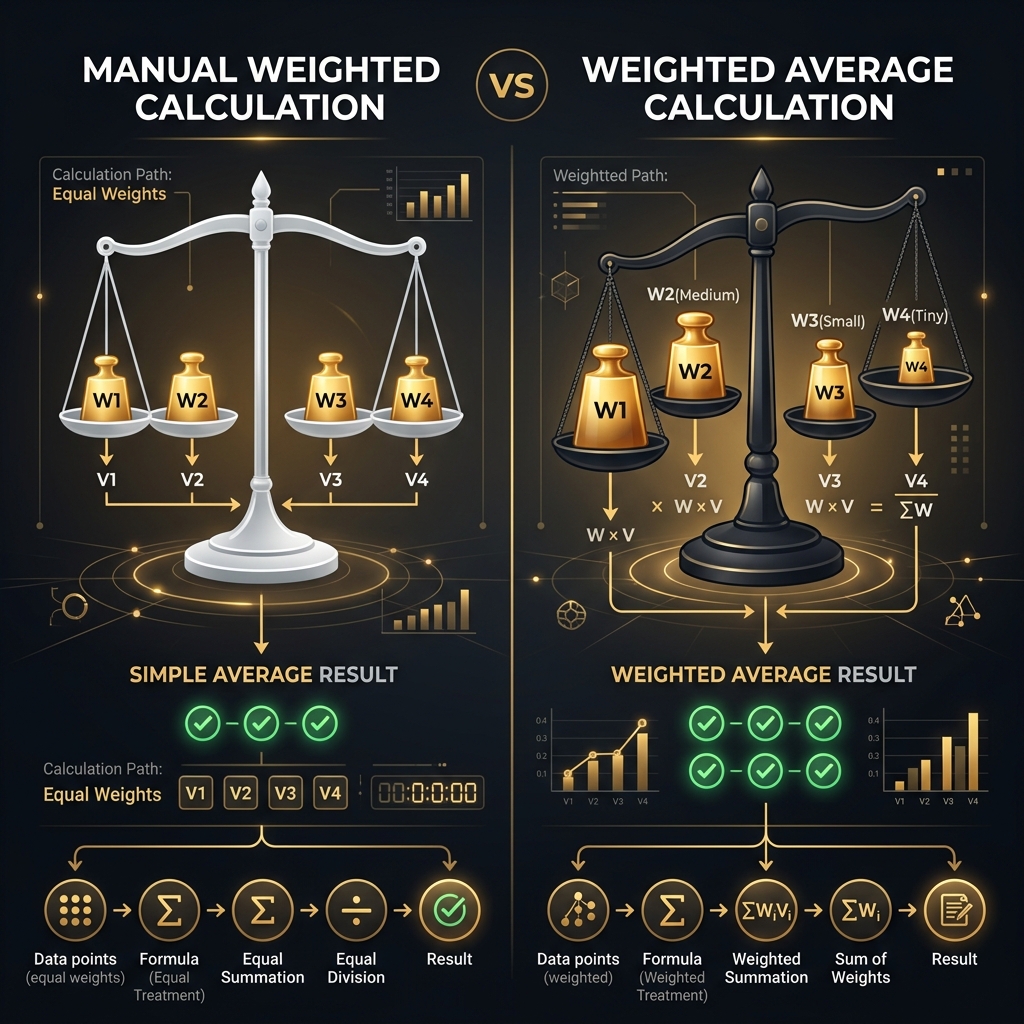
The weighted average gives more influence to higher-weighted values, pulling the result toward them compared to the equal-treatment simple average
How to Check Whether Your Manual Calculation Is Correct
Four quick checks catch nearly every manual arithmetic error.
Verify Every Multiplication
Go through each product one row at a time. One misplaced digit ripples through the entire calculation.
Recalculate the Total Weight
Add the weight column again from scratch. Fresh addition catches errors that re-reading misses.
Check the Final Division
Divide once more. Estimate first: 1037/12 should be near 1000/12=83.3, so 86.42 is reasonable. If your answer were 864.2, estimation would flag it instantly.
Compare with Expected Results
The weighted average must fall between your smallest and largest values. This three-second boundary check catches catastrophic errors.
Common Mistakes in Manual Weighted Average Calculations
These five mistakes appear repeatedly and every one produces a wrong answer.
Multiplying by the Wrong Weight
Row misalignment causes this. Always number rows and verify alignment before computing.
Forgetting to Sum All Weights
Some people sum products but skip summing weights, dividing by an assumed total instead.
Dividing by the Number of Values
The most dangerous mistake because it looks plausible. Dividing by count converts a weighted average into a simple average.
Mixing Percentages and Decimals
Using 0.40 for one weight and 25 for another creates a scale mismatch. Pick one format.
Using Mismatched Value-Weight Pairs
Always confirm each value sits beside its correct weight before multiplying.
Quick Error Checklist
Error Prevention Checklist
ReferenceTips to Calculate Weighted Averages Faster by Hand
Speed comes from structure, not skipping steps. These habits cut manual calculation time nearly in half.
Organize Data Before Calculating
Write all values and weights in a neat table before multiplying. Jumping between sources causes errors.
Use a Calculation Table
A three-column table (value, weight, product) keeps everything visible. This is the biggest time-saver.
Round Only After the Final Step
Rounding intermediate products introduces cumulative error. Keep full precision until the final division.
Double-Check Intermediate Totals
Adding products in groups and recording subtotals lets you pinpoint errors without recalculating everything.
Practice Problems
Test your skills with these three problems.
Beginner Practice Question
A student scores 80 (weight 2) and 90 (weight 5). What is the weighted average?
Intermediate Practice Question
A product gets 5 stars from 120, 4 stars from 60, 3 stars from 15, and 1 star from 5 reviewers. Calculate the weighted average rating.
Advanced Practice Question
Portfolio: Asset A returned 15% (weight 0.35), B returned 8% (0.25), C returned -2% (0.15), D returned 22% (0.25). Find the weighted return.
Answer Key and Solutions
Practice Problem Solutions
AnswersFrequently Asked Questions
How do you calculate a weighted average manually?
Multiply each value by its weight, sum all products, then divide by the sum of all weights.
What is the weighted average formula?
WA = (x1*w1 + x2*w2 + ... + xn*wn) / (w1 + w2 + ... + wn).
Can you calculate a weighted average without a calculator?
Yes. Pen, paper, and basic arithmetic are all you need. Organize data in a table and follow the formula.
Do the weights have to add up to 100%?
No. Weights can total any number. The formula divides by whatever they sum to.
Can weights be decimals?
Yes. Decimal weights like 0.25 or 1.75 work the same as whole numbers.
Can weights be negative?
Technically the math works, but negative weights rarely have meaningful interpretation. Keep weights positive.
What happens if one weight is zero?
A zero weight removes that value from the calculation entirely.
Why do I divide by the total weight instead of the number of values?
Dividing by total weight accounts for unequal importance. Dividing by count defeats the purpose of weighting.
How can I check my manual calculation?
Re-verify multiplications, recount total weight, redo the division, and confirm the result falls between your min and max values.
Is manual calculation more accurate than using a calculator?
Both use the same formula. A calculator reduces human error on large data sets. Manual calculation builds deeper understanding.
Conclusion
Calculating a weighted average by hand takes about ten minutes to learn and pays dividends for years. You now know how to organize data, multiply value-weight pairs, sum products, and perform the final division. You have practiced with grades, ratings, and investment returns.
More importantly, you know where mistakes hide: mismatched rows, dividing by count, mixed formats, and skipped verification. The checklist and strategies in this guide keep your calculations accurate.
Ready to build that instinct? Start with the beginner problem above, then verify your work with our weighted average calculator. What will you calculate first by hand?